

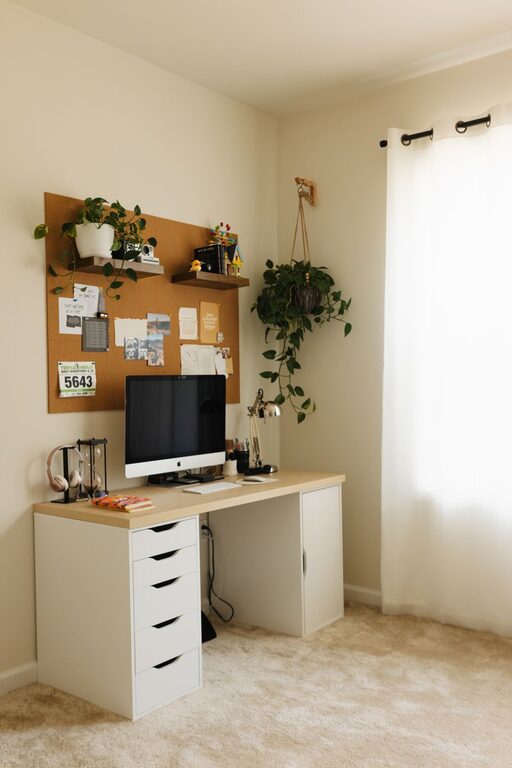
Creating a home workspace that balances comfort and functionality is essential, especially as more people work remotely or pursue creative projects at home. A cozy and well-organized workspace can help boost your focus, reduce stress, and make your workday more enjoyable. Here are some practical tips to design a home office area that feels inviting and stays efficient.
Choose the Right Location
Your workspace should be in a quiet, well-lit area that minimizes distractions.
– Natural Light: Position your desk near a window if possible. Natural light can improve mood and reduce eye strain.
– Low Traffic: Select a spot away from busy household areas to maintain focus.
– Dedicated Space: Even a small nook or corner can become a great workspace if it’s reserved exclusively for work.
Invest in Comfortable Furniture
Comfortable furniture is key to staying productive without physical discomfort.
– Ergonomic Chair: Choose a supportive chair designed for long periods of sitting to prevent back pain.
– Desk Height: The desk should allow your arms to rest at a 90-degree angle with your keyboard and mouse.
– Adjustable Furniture: Consider desks or chairs that can be adjusted to suit your height and posture.
Optimize Lighting
Proper lighting reduces eye strain and creates a pleasant atmosphere.
– Mix Light Sources: Combine overhead lighting with task lamps for flexibility.
– Warm Light Bulbs: Use warm or natural-colored light bulbs for a cozy feel.
– Avoid Glare: Position screens and lights to minimize glare on your monitor.
Keep It Organized
A clutter-free space supports a clear mind.
– Storage Solutions: Use shelves, drawers, and organizers to keep supplies tidy.
– Cable Management: Use clips or sleeves to keep cords neat and prevent tangles.
– Regular Decluttering: Set a weekly routine to tidy your workspace and remove unnecessary items.
Personalize Your Space
Adding personal touches makes your workspace inviting and inspiring.
– Plants: Small indoor plants can improve air quality and add greenery.
– Artwork: Hang inspiring prints or photos that make you smile.
– Comfort Items: Include cozy elements like a soft throw blanket or cushions.
Use Technology Wisely
Technology should support your work, not distract from it.
– Reliable Equipment: Invest in a good-quality computer, headphones, and internet connection.
– Monitor Placement: Use a monitor stand to keep the screen at eye level.
– Minimize Distractions: Turn off non-essential notifications during work hours.
Incorporate Productivity Tools
Keep your workflow efficient with helpful tools.
– Planner or Calendar: Use digital or paper planners to organize tasks and deadlines.
– Whiteboard or Corkboard: Visualize projects and reminders with boards.
– Task Apps: Utilize apps to track to-dos and progress.
Maintain Good Air Quality
A fresh environment helps your brain stay sharp.
– Ventilation: Open windows regularly to let in fresh air.
– Air Purifiers: Consider an air purifier if your space is closed or prone to dust.
– Humidity: Use a humidifier if the air feels too dry.
Create Zones for Different Tasks
If space allows, separate your workspace into zones to change your mindset with tasks.
– Focus Zone: The main desk area for computer work and writing.
– Creative Zone: A small table or area for brainstorming and sketching.
– Relaxation Zone: A comfy chair or corner for breaks and reading.
Establish Routines and Boundaries
To make the most of your home workspace, stick to routines and respect your work hours.
– Consistent Schedule: Start and end work at regular times.
– Breaks: Take short breaks to stretch and rest your eyes.
– Work-Life Separation: Close your workspace or put away work materials after hours.
—
By thoughtfully designing your home workspace, you’ll create a comfortable and efficient place that supports your productivity and wellbeing. Whether you have a dedicated room or just a corner to call your own, these tips can help you make the most of your space. Happy working!